
Refill with confidence
Nelko PP01 paper and ink: choose the right refills
Buying Nelko PP01 paper starts with the model name, not just the “2 × 3” label. Match the paper and cartridge to your printer, check the pack contents, then estimate what your next set of photos will cost.
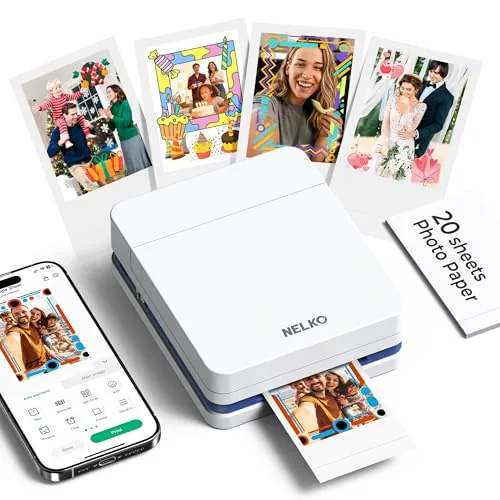
Which Nelko PP01 paper and ink should you choose?
Start with paper that explicitly names PP01 and the NELKO 520 color ink cartridge. Nelko lists both consumables for PP01 and PP03. This guide covers PP01; matching the printer model on the package matters more than matching a photo size in a search result.
| What you need | What to match | What to check in the pack |
|---|---|---|
| Sticker photo paper | Explicit PP01 compatibility; the manual specifies 52.3 × 90 mm sheets. | Check the sheet count of the selected pack before comparing refill costs. |
| Color ink cartridge | NELKO 520, listed for PP01 and PP03. | Cartridge quantity and the complete refill price. |
| Waste ink container | The PP01 manual says to replace it when replacing the cartridge. | Confirm whether it is included or needs to be ordered separately. |
Check the official paper options, 520 cartridge listing and PP01 manual, printed pages 02 and 16. Do not assume a similarly sized ZINK sheet, label roll or another brand’s cartridge is compatible.
Plan your next project
Estimate your PP01 printing costs
Enter the refill prices you see and a cartridge-yield estimate you are comfortable using. Add test prints and reprints so the result reflects the photos you want to keep. All amounts are in US dollars.
How the estimate works
Cost per attempt = paper pack price ÷ sheets + cartridge refill cost ÷ estimated attempts per cartridge.
Project cost = cost per attempt × (kept photos + extra attempts). Cost per kept photo = project cost ÷ kept photos.
“Buy from empty” rounds up to whole paper packs and whole cartridge refills. It assumes you have no usable supplies left. That checkout total can be higher because some supplies remain for later projects.
These are planning estimates, not a promise of cartridge life. Cleaning, drying ink and print choices can change usable yield. The printer, tax and shipping are excluded unless you include those charges in the prices you enter.
For a more cautious budget, recalculate with a lower cartridge yield and a few extra attempts. Compare the full project total with a print service when you want a whole album.
A worked example
What do reprints add to your PP01 refill cost?
Use this example to understand the refill calculator. These are invented planning inputs, not current prices: $12 for 60 sheets and $30 for a cartridge refill, including its required waste ink container. Assume you want 20 finished photos.
| Your planning assumption | Print attempts | Estimated supplies cost | Cost per kept photo |
|---|---|---|---|
| 60 attempts per cartridge; no reprints | 20 | $14.00 | $0.70 |
| 60 attempts per cartridge; four extra attempts | 24 | $16.80 | $0.84 |
| 40 attempts per cartridge; four extra attempts | 24 | $22.80 | $1.14 |
With the middle assumption, each attempt uses an estimated $0.20 of paper plus $0.50 of ink. Four extra attempts add $2.80, so your cost per photo kept rises by 20%. If you start with no supplies, the example checkout is $42 in all three cases: one paper pack and one refill. Some supplies remain for another project.
Sheet size ≠ picture size
Will the photo fit your journal?
Nelko markets this paper as 2 × 3 inches, while the PP01 manual specifies 52.3 × 90 mm sheets. Neither measurement guarantees an edge-to-edge image.
Check the borders and useful picture area before you plan a scrapbook layout. The PP01 review’s size example explains the listing’s stated image area. Its attributed owner photos show why borders matter.
Try your layout before a batch
Leave room for the whole sheet, including the blank border. Print one crop first, especially for group photos or text. For larger pictures and different printing systems, compare photo printers for journals and scrapbooks.
Load carefully and plan regular use
Check the model
Read the printer’s model label and the refill’s compatibility list. PP01 photo supplies are a different purchase from paper for a Nelko label printer.
Load a small stack
The manual specifies the print side facing down and a maximum of 10 sheets. Keep sheets flat, clean and dry.
Allow for inkjet care
The manual recommends printing at least weekly. If you print only a few times a year, compare that upkeep with a print service before stocking up.
Use the diagrams in the official manual, printed pages 04, 16 and 17 for loading and care. For phone connection steps, see the PP01 app setup section.
Before buying another refill
Why does your PP01 reject paper or ink?
Check the symptom before buying supplies.
A NELKO mark appears on the photo
Nelko identifies upside-down paper as a likely cause. Load its printable face downward.
“No paper” appears with sheets left
Check for a flat, aligned stack. Nelko recommends keeping 2–10 sheets loaded.
A cartridge is not recognized
Remove protective packaging, reseat until it clicks, then power off for 1–2 minutes. Persistent errors need manufacturer support.
Part of the photo is missing
Nelko specifies PP01 firmware 1.3.8939+ and app versions Android 4.7.2+ or iOS 4.9.3+. If updating fails, keep the app open while submitting feedback to preserve useful logs.
PP03-compatible does not mean sticky-backed: Nelko distinguishes non-adhesive PP03 paper from adhesive PP01 paper. Check the selected pack’s backing.
Source: Nelko's PP Series FAQ, checked October 15, 2026.
Still choosing your PP01?
White and Milky are two colors of the same PP01 model. Compare the selected bundle and included supplies, then choose the finish you prefer. For the broader buying decision, read the Nelko PP01 review.
These printer links are affiliate links; FasterBuyers may earn a commission. The refill links above go to Nelko’s official product information.
Sources: Nelko product information and PP01 manual, checked October 1, 2026. Find current manuals and support.